Know what changed. Catch what looks wrong.
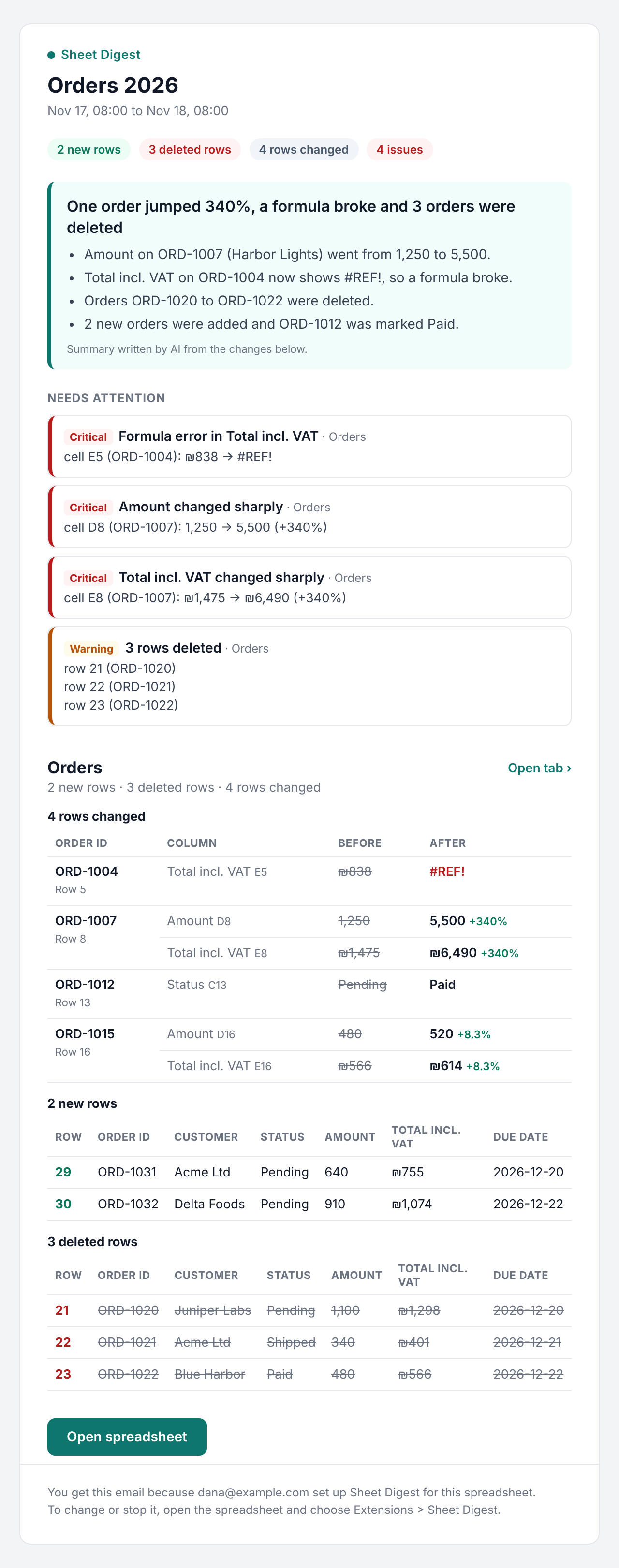
Sheet Digest emails you one short summary of every change in a shared spreadsheet, and flags deleted rows, broken formulas and sharp jumps on its own. No rules to write, no formulas to maintain.
Free for one spreadsheet. Pro is $8 a month. Your data stays in your Google account.
For the person who owns the spreadsheet everyone else edits
Orders, stock, payroll inputs, a client tracker, a form that fills a sheet. Other people change it all day. You need to know, once a day, whether anything important happened.
Operations and office managers
See every order, status and quantity that changed overnight without opening the version history.
Small business owners
Know when a price, a payment or a row disappears from the sheet your staff updates.
Finance and team leads
Spot a broken formula or a number that jumped tenfold before it reaches a report.
Set it up once. Read one email.
Install the add-on
From the Google Workspace Marketplace, then open it from Extensions in any spreadsheet.
Pick the tabs to watch
Sheet Digest finds the column that identifies each row, such as an order ID, so sorting and inserting rows never look like changes.
Get the digest
Every day or every week at the hour you choose: new rows, deleted rows, changed values, and the issues worth a look first.
Issues are found for you, then listed first
Thresholds adapt to each column, and you can make it more or less sensitive.
Your spreadsheet stays in your Google account
- Snapshots are stored inside the spreadsheet's own add-on storage, not on our servers.
- The email is sent from your own Gmail account.
- For the optional AI summary, only the list of changes is sent, never the whole sheet, and nothing is kept.
- No ads, no selling data, no training AI models on your data.
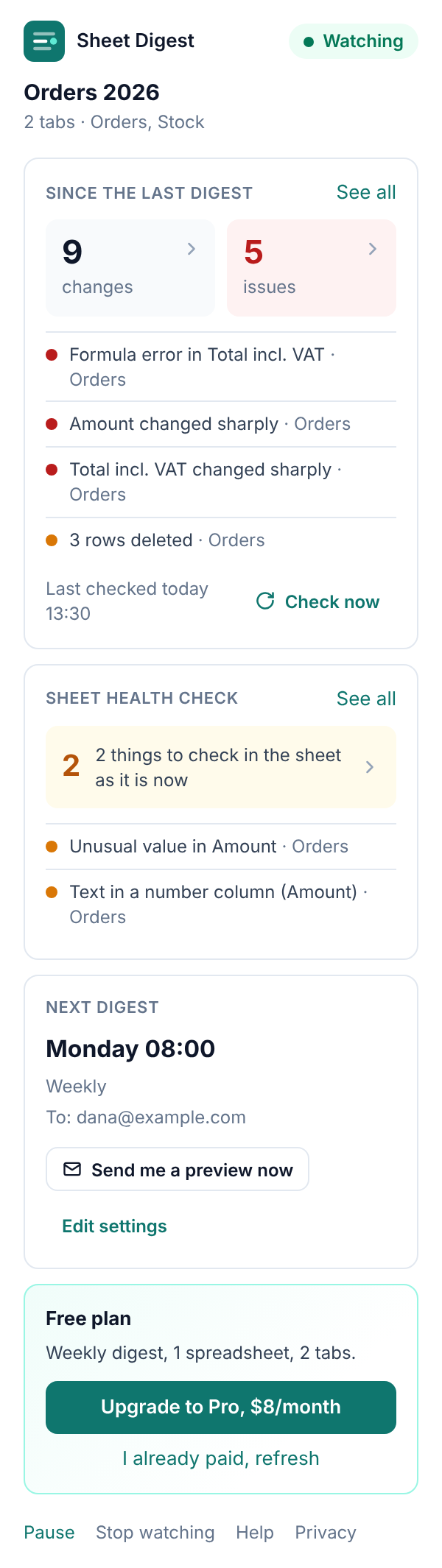
Start free. Upgrade when you need it daily.
Free
- 1 spreadsheet, up to 2 tabs
- Weekly digest to you
- Automatic issue detection
- AI summary (2 a week)
- Full detail up to 10,000 cells
Pro
or $79 a year (two months free)
- Up to 10 spreadsheets, any number of tabs
- Daily or weekly digest
- Up to 5 recipients
- Instant email for critical issues
- Ignore your own edits
- Full detail up to 60,000 cells
Prices in USD. Taxes are handled by our payment provider. Cancel any time.
Common questions
How is this different from notification rules in Google Sheets?
Google's built-in notifications email you about edits, often one email per change, and say little about what changed. Sheet Digest sends one email per day or week with the actual before and after values, and points out what looks wrong.
Do the people who edit the sheet need to install anything?
No. Only the person who sets up the digest installs the add-on. Recipients just get an email.
What if someone sorts the sheet or inserts rows?
Rows are matched by an ID column (detected automatically), so sorting and inserting are not reported as changes. Without an ID column, rows are matched by content.
How large can the spreadsheet be?
Full detail covers 10,000 cells on Free and 60,000 on Pro. Larger tabs are still watched in compact mode, which reports changed rows without their old values.
Can I turn off the AI summary?
Yes, in Options. The digest then opens with a plain summary written from the counts.
Does it work in Hebrew?
Yes. The add-on and the email are available in English and Hebrew, with right-to-left layout for Hebrew.
Get the first digest of your own sheet
Sheet Digest is in review on the Google Workspace Marketplace. Leave your email and we will send one message when it is live.
Install free from the Marketplace